> ## Documentation Index
> Fetch the complete documentation index at: https://docs.codeflash.ai/llms.txt
> Use this file to discover all available pages before exploring further.
# Auto Optimize Pull Requests
> Automatically optimize new code in pull requests with Codeflash GitHub Actions workflow
Optimizing new code in Pull Requests is the best way to ensure that all code you and your team ship is always performant.
Automating optimization in the Pull Request stage is how most teams use Codeflash, to
continuously find optimizations for their new code.
To scan new code for performance optimizations, Codeflash uses a GitHub Action workflow which runs
the Codeflash optimization logic on the new code in every pull request.
If the action workflow finds an optimization, it communicates with the Codeflash GitHub
App and asks it to suggest new changes to the pull request.
We highly recommend setting this up, since once you set it up all your new code gets optimized.
## Pull Request Optimization 30 seconds demo
## Prerequisites
**Before you begin, make sure you have:**
✅ A Codeflash API key from the [Codeflash Web App](https://app.codeflash.ai/)
✅ Completed local installation with `codeflash init` ([Python](/getting-started/local-installation) or [JavaScript/TypeScript](/getting-started/javascript-installation))
✅ A configured project (`pyproject.toml` for Python, `package.json` for JavaScript/TypeScript)
## Setup Options
```bash theme={null}
codeflash init-actions
```
This command will automatically create the GitHub Actions workflow file and guide you through the setup process.
Alternatively running `codeflash init` also asks to setup the github actions.
Open a new pull request to your GitHub project. You'll see:
* ✅ A new Codeflash workflow running in GitHub Actions
* 🤖 The codeflash-ai bot commenting with optimization suggestions (if any are found)
Ensure that your Python environment installation works correctly and codeflash is able to run.
Create `.github/workflows/codeflash-optimize.yaml` in your repository:
```yaml title=".github/workflows/codeflash-optimize.yaml" theme={null}
name: Codeflash
on:
pull_request:
paths:
- '**' # Modify this to the path of your project in a mono-repo. Codeflash will only run when code in this directory is modified.
workflow_dispatch:
concurrency:
# Any new push to the PR will cancel the previous run, so that only the latest code is optimized
group: ${{ github.workflow }}-${{ github.ref }}
cancel-in-progress: true
jobs:
optimize:
name: Optimize new code in this PR
if: ${{ github.actor != 'codeflash-ai[bot]' }}
runs-on: ubuntu-latest
env:
CODEFLASH_API_KEY: ${{ secrets.CODEFLASH_API_KEY }}
steps:
- uses: actions/checkout@v4
with:
fetch-depth: 0
token: ${{ secrets.GITHUB_TOKEN }}
# TODO: Replace the following with your project's Python installation method
- name: Set up Python
uses: actions/setup-python@v5
with:
python-version: '3.11'
# TODO: Replace the following with your project's dependency installation method
- name: Install Project Dependencies
run: |
python -m pip install --upgrade pip
# TODO: Replace the following with your project setup method
pip install -r requirements.txt
pip install codeflash
- name: Run Codeflash to optimize code
id: optimize_code
run: |
codeflash
```
**Replace the TODOs** in the workflow file above with your project's specific setup commands.
Set the `working-directory` parameter in the yaml file, if the commands are meant to be run from some other directory.
Customize the dependency installation based on your package manager:
The workflow will need to be set up in such a way the Codeflash can create and
run tests for functionality and speed, so the stock YAML may need to be altered to
suit the specific codebase. Typically the setup steps for a unit test workflow can
be copied.
```yaml Poetry (Python) theme={null}
- name: Install Project Dependencies
run: |
python -m pip install --upgrade pip
pip install poetry
poetry install --with dev
- name: Run Codeflash to optimize code
run: |
poetry env use python
poetry run codeflash
```
```yaml uv (Python) theme={null}
- uses: astral-sh/setup-uv@v6
with:
enable-cache: true
- run: uv sync --group=dev
- name: Run Codeflash to optimize code
run: uv run codeflash
```
```yaml pip (Python) theme={null}
- name: Install Project Dependencies
run: |
python -m pip install --upgrade pip
pip install -r requirements.txt
pip install codeflash
- name: Run Codeflash to optimize code
run: codeflash
```
```yaml npm (JavaScript/TypeScript) theme={null}
- uses: actions/setup-node@v4
with:
node-version: '18'
- name: Install Project Dependencies
run: npm ci
- name: Run Codeflash to optimize code
run: npx codeflash
```
```yaml yarn (JavaScript/TypeScript) theme={null}
- uses: actions/setup-node@v4
with:
node-version: '18'
- name: Install Project Dependencies
run: yarn install --immutable
- name: Run Codeflash to optimize code
run: yarn codeflash
```
```yaml pnpm (JavaScript/TypeScript) theme={null}
- uses: pnpm/action-setup@v4
with:
version: 9
- uses: actions/setup-node@v4
with:
node-version: '18'
cache: 'pnpm'
- name: Install Project Dependencies
run: pnpm install --frozen-lockfile
- name: Run Codeflash to optimize code
run: pnpm codeflash
```
**Monorepo?** If your codeflash config is in a subdirectory, add `working-directory` to the steps:
```yaml theme={null}
- name: Run Codeflash to optimize code
run: npx codeflash
working-directory: packages/my-library
```
1. Go to your GitHub repository settings
2. Navigate to **Secrets and Variables** → **Actions**
3. Click **New repository secret**
4. Add:
* **Name**: `CODEFLASH_API_KEY`
* **Value**: Your API key from [app.codeflash.ai/app/apikeys](https://app.codeflash.ai/app/apikeys)
**Security Note**: Never commit your API key directly to your code. Always use GitHub repository secrets.
## How the Pull Request Optimization Suggestion looks
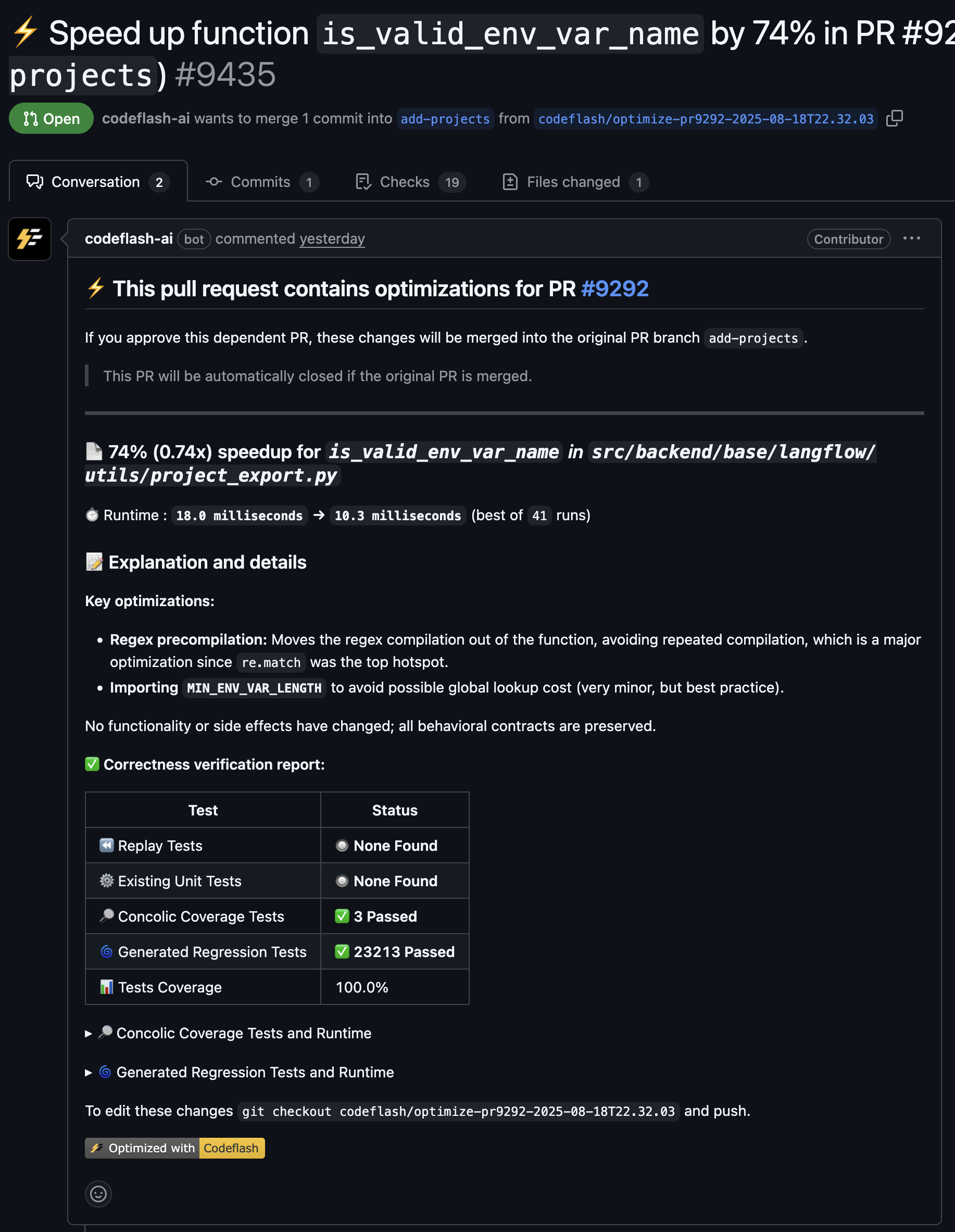
Codeflash creates a new dependent Pull Request for you to review with the reported speedups, helpful explanation for the optimization
and the proof of correctness. The pull request has the code change for you to review and accept.
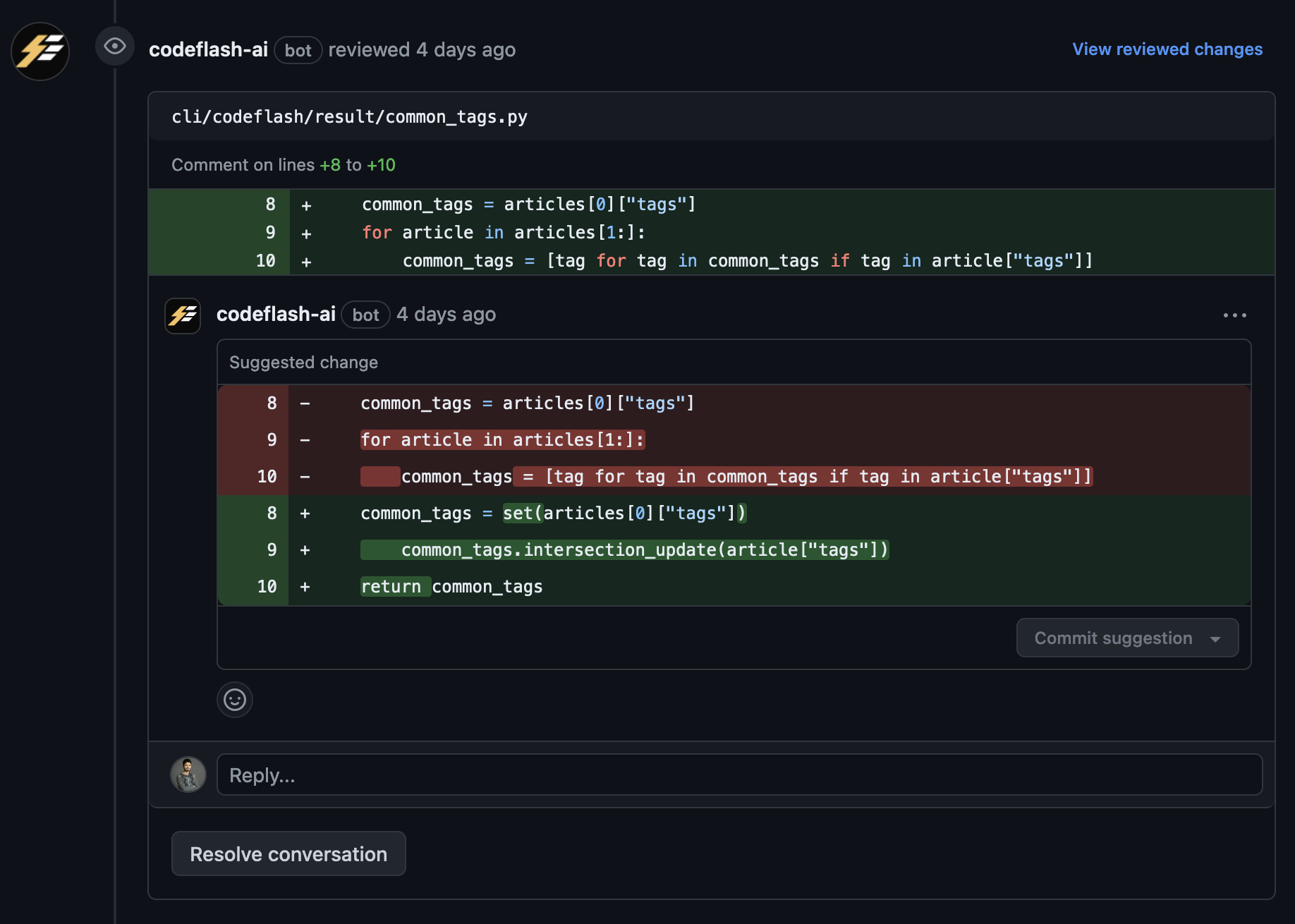
Sometimes it also makes an inline suggestion with the optimization.
We hope you enjoy the performance unlock the Pull Request optimization enables.
 Sometimes it also makes an inline suggestion with the optimization.
 We hope you enjoy the performance unlock the Pull Request optimization enables.